Detention Report
This report is available from Reports > Usage Reports.
Identifies assets that have not moved within a geofence for a specific time period and have exceeded the detention threshold. The detention report is tied to a geofence name and indicates when an asset has entered and exited the geofence location over a set period.
This report sorts the data by geofences.
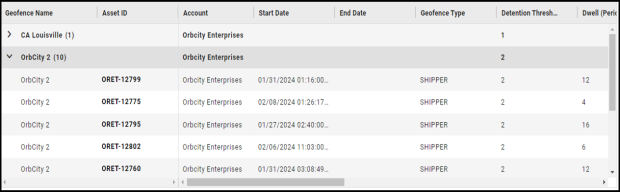
To modify a geofence detention threshold, refer to Edit an Existing Geofence.
View Location Tracking Report History for a Device
-
Click Reports > Detention Report.
-
In the Asset ID column, click the asset ID of the device.
-
On the Location Tracking History Report page for the selected device, specify a date range, and then click Search.
Assign a Profile
-
Click Reports > Detention Report, and then click an asset ID to access the Location Tracking History Report page.
-
From the Location Tracking History Report page, click
 (More Actions), and then click Assign Profile.